Server : Apache/2 System : Linux server-15-235-50-60 5.15.0-164-generic #174-Ubuntu SMP Fri Nov 14 20:25:16 UTC 2025 x86_64 User : gositeme ( 1004) PHP Version : 8.2.29 Disable Function : exec,system,passthru,shell_exec,proc_close,proc_open,dl,popen,show_source,posix_kill,posix_mkfifo,posix_getpwuid,posix_setpgid,posix_setsid,posix_setuid,posix_setgid,posix_seteuid,posix_setegid,posix_uname Directory : /home/gositeme/domains/lavocat.quebec/private_html/node_modules/json2csv/docs/
Upload File :
Current File : /home/gositeme/domains/lavocat.quebec/private_html/node_modules/json2csv/docs/cli-examples.md
# CLI Examples
All examples use this example [input file](https://github.com/zemirco/json2csv/blob/master/test/fixtures/json/default.json).
## Input file and specify fields
```sh
$ json2csv -i input.json -f carModel,price,color
carModel,price,color
"Audi",10000,"blue"
"BMW",15000,"red"
"Mercedes",20000,"yellow"
"Porsche",30000,"green"
```
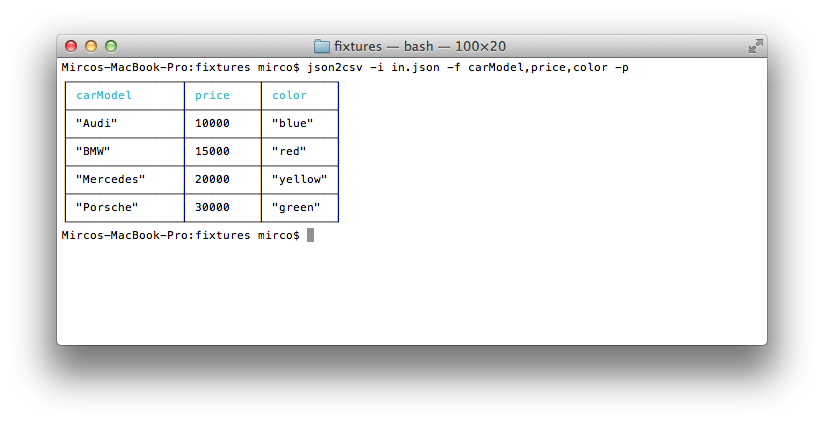
## Input file, specify fields and use pretty logging
```sh
$ json2csv -i input.json -f carModel,price,color -p
```
## Generating CSV containing only specific fields
```sh
$ json2csv -i input.json -f carModel,price,color -o out.csv
$ cat out.csv
carModel,price,color
"Audi",10000,"blue"
"BMW",15000,"red"
"Mercedes",20000,"yellow"
"Porsche",30000,"green"
```
Same result will be obtained passing the fields config as a file.
```sh
$ json2csv -i input.json -c fieldsConfig.json -o out.csv
```
where the file `fieldsConfig.json` contains
```json
["carModel", "price", "color"]
```
## Read input from stdin
```sh
$ json2csv -f price
[{"price":1000},{"price":2000}]
```
Hit <kbd>Enter</kbd> and afterwards <kbd>CTRL</kbd> + <kbd>D</kbd> to end reading from stdin. The terminal should show
```sh
price
1000
2000
```
## Appending to existing CSV
Sometimes you want to add some additional rows with the same columns.
This is how you can do that.
```sh
# Initial creation of csv with headings
$ json2csv -i test.json -f name,version > test.csv
# Append additional rows
$ json2csv -i test.json -f name,version --no-header >> test.csv
```
